Wednesday, 22 May 2013

Unmatched Ad Request in Google AdSense.

Posted by Unknown on 00:00 with 3 comments
If you are an AdSense publisher and monitoring your account regularly, you must have noticed "unmatched Ad Request". You can view it under Performance report > Bid type. 

What is Unmatched Ad Request basically? 
When a user visits your site or blog with AdSense Ad units, these Ad units sends a request to AdSense to display a relevant ad to the visitor. If there are no ads returned for this request, it is counted as unmatched Ad request. The ad units are then shown as blank spaces. 


The problem is not that you are getting Unmatched Ad Requests. The real trouble is that some publisher will have more of these requests than others. The chances of earning from these ad requests are NIL since there are no ads served and there is no clicks or impressions pay. 

Reasons for higher unmatched ad requests. 
  • Using link units on site. If you are using link units on a blog/site, there will be higher unmatched ad requests. This is due to the fact that a matched ad request for a link unit is counted only if a visitors click on them. Since there are hardly any clicks on link units these days, these all are counted in unmatched ad requests. 
  • Poor content. Chances are that your content is not receiving enough bidders due to poor quality contents. No one want to show ads on a web blog with low or bad quality contents. So, may be you are not getting enough ads as per ad requests. Some ad requests don't have ads to display. 
  •  Blocked list. If you block half of the advertisers, how could you fulfill all the ad requests your blog generates. So be careful about that. 
  • Unusual ad size. Square or rectangle and more frequently used ad sizes have more bidders and hence lower unmatched requests. Don't go for any unusual ad sizes. 

Although you know now what may be the reason for unmatched ad requests, you can hardly take any steps to shield yourself. Almost everyone keeps their filter list small. If you are approved by AdSense, there is almost negligible chances of poor quality content. And since Google is the leader in publishing-advertising market, number of bidders in most cases will never run out for an ad space. 

How to utilize unmatched ad requests to your benefits.?
This is where back up ads come into the picture. While creating ad unit, Google asks for back up ads in case there is no ads to display. Link one such another ads from any other publishing network you are using. This is the most you can do with unmatched ad requests. 

At last, you don't need to really worry about unmatched ad requests unless you are earning from AdSense. There is no any such negative aspects of it, and there is hardly anything you can control. You can at most write quality contents to attract maximum bidders, use more obvious ad sizes, keep your filter list small. 

mb.


Tuesday, 21 May 2013

How to Prevent Blogger domain redirection.

Posted by Unknown on 00:00 with 1 comment
You must have noticed that Blogspot's domain has been redirecting to country specific domains. Google has taken this step to provide country specific redirection in order to maintain regional censorship. If a country prohibits the content of a blog, Google will stop servicing that content in that country. 


So what's the problem with redirection? 

Nothing if you don't care about your rankings, your ad campaigns and SEO practices. I am sure you do care about all these things. Here are some negative effects of your blogger domain redirection to country specific domain. 
  • Regarding Rankings: Most of ranking systems differentiate between .com and .in. If you go and find your alexa rank of your blog with .com and .in or .co.uk, they will all be different. Now what is happening is your effort to improve your ranking is distributed among different domains. 
  • SEO practices. So, your blogspot blog is hosted on .com, .co.uk, .co.uc, or .in domain? Isn't that a case of content duplicated?  And if you know a little about SEO, you must be aware that it will affect badly? Google says regarding the country specific redirection that it is trying that SEO practices remain unaffected but its only "trying". It is affected negatively. 
  • Ad campaigns. If you are with AdSense, its okay. But if you show ads of Media.net, where its compulsory to getting approved of each site to host ads, they will not count "clicks and impressions" for .in if you registered with .com. I personally contacted media.net representative about the problem, and what he said was, I have to manually submit all the domains. Now there are 100 countries from which I get traffic. Is it possible? They didn't get me to a solution. 
 Is there any solution? 
There is no problem without any solution. Personally, I have two of the best solution here. 
  • Get a custom domain. Custom domains are not redirected to country specific domains. Buy one for your blog. Its not so costly. Blogger provides domain in as less as 10$ for a year, and with other domain hosting services, its even lower. 
Not interested in buying a domain? Here is another solution. 
  • Go to Blogger dashboard > Template > Edit HTML. 
  • Back up your template in case something wrong happens.
  • Now search for the line <b:include data='blog' name='all-head-content'/>. Press Control + F and then search it. 
  • Just below the line paste these lines,: 
&lt;script type=&quot;text/javascript&quot;&gt;
var str= window.location.href.toString();
if ((str.indexOf('.com/'))=='-1') {
var str1=str.substring(str.lastIndexOf(&quot;.blogspot.&quot;));
if (str1.indexOf('/')=='-1') {
var str2=str1;
}
else {
var str2=str1.substring(0,str1.indexOf('/')+1);
}
window.location.href =window.location.href.toString().replace(str2,'.blogspot.com/ncr/');
}
&lt;/script&gt;
  •  Now, preview template to see if everything is okay. 
  • Save templates. The work is done. 
This javascript redirects country specific redirection back to .com domains. Although this will reduce site's loading speed, since there are two redirection, one from .com to country specific and then back to .com domain, but still its a good way if you really don't wanna go for a custom domain. 

mb.

Friday, 17 May 2013

New Contact Form widget for blogger.

Posted by Unknown on 00:00 with 2 comments
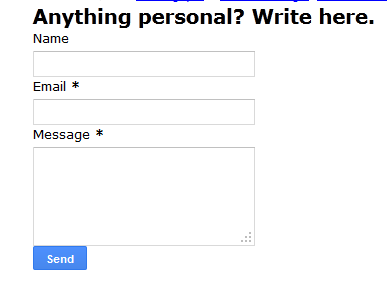
Someone told me that "Blogger has introduced a new Contact Form Widget". So, I checked it within minutes. And I find it simple yet extremely useful to connect to people in personal. 

Now, First thing is "how to add the contact form widget to your blog". 

Go to Blogger Dashboard -> Layouts -> Add a widget. 


Select More gadgets in the left panel, and Add a Contact Form. 

After adding it to your blog, it will look like: 

Here, I have provided the Title, Anything personal? Write here. You can put whatever you want. 

Now, whats the benefits after all? Why anyone should care about it? 
  • First of all, anyone who wants to interact with you and not finding any platform to do so, its a great way. 
  • Its a great way of accepting guest posts. You don't need to ask people to email you. Just make a page for guest post submission, and add the widget to that page. 
  •  You can ask for ads through this contact form. "You wanna place your ads on this blog? Contact here.." -- something like this. 
  • May be more. 
The only worst part of this widget is its so-simple unattractive design. Its lame actually. If you are already using it, share your opinion. We will love to read it.

mb.

Thursday, 9 May 2013

Cost per Click is the amount an advertiser is willing to pay for the clicks that are generated on the ads shown on your page. AdSense has a bidding process in which different advertisers bid for the ad space on your blog and the highest bidder gets a chance to display their ad. AdSense on its own ensures that the most paying ad is shown on your page so that you earn maximum. Its not in your control to decide to decide the ads or to fix the amount for charging. However, by following some of the basic practices, you can increase you Cost Per Click for the ads and earn maximum from the adsense. 

Practices to increase AdSense Cost Per Click.
  • Enable all of your ad units to show both text and images rich ads. When you limit a unit to show only a particular kind of ad, either text or image ads, you are limiting the number of bidders and thus lowering your chances of earning maximum. Lets get it with an example. Suppose you have limited a ad unit to show only text ads. And you receive a CPC of 1$ on it. What you miss out is that there may be an Image ad that is willing to pay more than 1$ per click. By increasing the number of advertisers to compete for the ad unit, you are increasing your chances of getting higher bid than you get normally. So, its always better to enable all ad units to show both images/media ads and text ads.
  • The first ad unit that appears in your blog's html receives the ads with maximum CPC. Suppose you have put three ads units, one as a leader board, a sidebar, and one at the bottom of your posts. Now, naturally you will wish that the highest paying ads are shown on leader board, since there are more chances of people clicking on them, so you have to put the leader board AdSense ads first in your html code. You may achieve this by trying and testing. 
  • Keep your filter list small. Filtering majority of ads for whatever reason will ultimately lead to less advertisers competing for your blog, and hence less earning.
  • Developed countries CPC are usually higher than under-developing countries. You will get a higher CPC from US than from India. So, building a country specific audience will limit your reach. Its also not at all advisable to target only US audience. You are paid for Indian clicks too. Whatever it is. The point is, don't limit your audience to a particular country and try to build a follower list of countries like US, UK, etc. 
The ultimate goal is to allow maximum number of advertisers bid for the ad space on your blog. The more competition, the more earning. By enabling both rich media ads and text ads does this only. 
However, in doing all these practices you must avoid some points. 
  • Don't believe that writing for high paying keywords will earn you more CPC. This is a good practice unless you over do it. You are writing for people who reads you. Don't over do it. Moreover, Google says that it don't encourage any such practice.
  • Don't use multiple accounts. Its a violation of terms for Google and your account will be suspended as soon as they discover it. 
  • Don't change the behavior of AdSense Ads in any way. Its not permitted under Google terms and conditions. 
Most of the publishers learns from experience. Keeping these points will certainly help you in increasing CPC for AdSense ads.
If you have any point in your mind, mention in comments. It will be a privileges for me and my readers. 

mb.

Saturday, 4 May 2013

SEO practices: Quality content is the king

Posted by Unknown on 22:47 with 6 comments

A site with quality content will attract more visitors naturally. No matter how beautiful you design a site, if you don't have good content no one will read you. Creating good quality and useful content will influence readers more than anything else on your blog. When a person searches for something, and he finds it exactly on your blog, chances are that he will refer your content in his circles thus increasing your reach. In blogging world, "Content is king" is over-used word and rightly so. You cannot expect huge traffic in the absence of Quality service. 

You may want to read the earlier parts of SEO practices. 

Best practices for quality content.
  •  Easy-to understand. Write it up for an average person. You won't find anyone reading your blog with a dictionary in his hand. Always write keeping your audience in mind. If i come across any article that put strain on my mind while reading, I will simply switch over to another.  Keep it simple, break a very long sentence in two or more, and always try to keep it free from spelling mistakes and grammatical errors. If you are not that much good in English, ask your friends or colleagues to rectify it. Using too difficult words to understand is a bad idea. The user always have the choice to another good written and easy to understand articles. You have to out perform them.
  • Stay focused on the topic. Do not deviate from the topic. Stick to the plot you have chosen to write about. Talking about several topics in the same article is not a good idea. Choose a topic for an article and always organize your content around it. A little variation in the content is okay, with proper sub headings and paragraphs. The basic idea is if user comes to you looking for "Link building strategies", he should read that only. While writing an article, if you come up with some random and altogether new idea, write it down on a piece of paper for your future posts. Simple!!
  • Create unique content. The primary question is "Why someone read your article if its already written on web"? Why yours only. Everything is over-written on web. Search a topic and you will find thousands of websites in the results. The main aim is to compete to those websites and to be proved better than them. At some point of time writing about a topic, you may find that there is no new thing in your mind about it. well, you can then include some charts to describe it more, take the help of pictures and statistics to prove the point. Lastly, If you cannot come up with new ideas, at least put that idea in a unique manner.
  • Write for people, not for search engines. Its not the search engine that will read your content or benefit from it. Write for people. Search engine is a just way of discovering your content. Avoid using too much keywords since it may annoy the readers. What if I use "SEO practices: Quality content is the king" all over this post, will you enjoy it? You won't even come back to my blog again. Putting keywords in texts is a good SEO practice but it should not be done too much. Many webmasters agree that putting a keyword every 100 words of text is the best policy and I agree to it. You may have your own standards but keep in mind not over-doing it.

If you have in any other point in your mind,  feel free to discuss it in comments.

mb.

Friday, 3 May 2013

 Here, I give you two URLs.
  1. http://y2do.blogspot.com/2013/05/best-seo-practices-improving-structure-of-URL.html
  2. http://y2do.blogspot.com/2013/05/asdckefwk234mkvesvk4fwdefsdfjiw3t2k4.html
In both the above URLs, which one you find more easier to remember? Can you identify what the post content is with the second URL?

URLs are the first thing you see or type in a browser. Creating a descriptive URL helps in keeping your contents organized on one hand and friendly for those who want to link to your article on the other.

There are certain benefits of Using descriptive URLs.
  • With a descriptive and easy-to-remember URL, you provide an option to a visitor to remember it and visit you again. 
  • URLs are displayed in search engines and people searching a particular query usually see the URL before visiting a site/blog. With a meaningful URL, you are increasing your chances of Search Engine visits. 
  • If the URL contains relevant words instead of random digits and alphabets or some IDs, this provides users and search engines with more information about the page. 
How to select a better URL structure.
  •  Create URLs that are relevant to your page contents. People may guess what you have written by just reading it. 
  • Be short but use words to create one. Picking some words from the article itself and framing a better URL is a better idea. 
  • Put keywords in the URL itself. 
  • Avoid using /article1.html type URLs. 
  • Do not using too lengthy URL that it don't even fit in browser :P Being descriptive don't mean you put the whole summary of content in the URL itself. 
  • Use one URL for one article. Having different locators for the same article can be bit confusing.
How to create a custom URLs.
You can create a custom URL in blogger dashboard while creating a post.Usually the permalink or the URL of the post is taken from the title you use for your article. 


You can see that the URL is taken from the title by default. 
To change the URL according to your need and preference, click on custom permalink. Blogger will ask you to enter your choice and create the permalink accordingly as shown in the below picture. 


I have not worked with WordPress, so don't know the process for it. You may search it on web, or if you know it already, you can mail me the steps along with some snaps and I will provide a recognition to your support along with a link back to your blog. 

You may like to read the earlier chapters of Search Engine Optimization. 
Seo: search engine optimization Introduction. 
Learning seo: working with titles and metatags.

mb.


Page titles is the entry for visitors to the home of contents and information. Having a poor title will tell them to leave without getting in. Getting a good, relevant and unique titles should be first priority in Search Engine Optimization. 


Unique title for each page. Did you ever find two of the chapters in the same with the same name? Create unique title for each of your post. Don't repeat any title. This is not a compulsory thing but still its the ideal thing to create a different title for each post or article. 

The <title> for you post is the what is displayed in search engine results. Chances are that user will visit you if the title really attract him. I said that earlier, Titles are the opening doors to the vast information you have written in your blog. If you don't keep them good, you are allowing people not to visit you. 

Use descriptive but brief title. There is no point putting a complete two line sentence in title only. Make it brief but highly relevant to whatever you have discussed in the post. You should use some of the keywords related to the article. However, avoid keyword stuffing. Search Engines don't like it and it will degrade your performance. The best practices as suggested by my blogger friends is a title of about 5-6 words relevant to the article with 2-3 keywords accordingly. Avoid too long title, and keyword stuffing in titles. Using a keyword or two is a good practice.

Use meta-tags to describe your article. You cannot put the complete description in the titles. A page description meta-tags tells the search engine about the summary of the page. When a search result is presented, along with title Google may use your meta tag in description in that result. Writing a good description will increase chances of your visitors. However, always try to
  • provide accurate description in meta tags.
  • avoid keywords-only description. 
  • avoid using the complete post in meta-tags.
  • using a unique description for each page. 
Meta tags is a summary to the articles which you have written. And this summary is shown to the user searcher. A person by taking a glimpse to the meta-tags can decide whether to visit the site or not. So, writing a good meta description is a necessary thing for you. 
These two aspects, the titles and the meta-tags are the first steps towards the optimization of a blog / site for a search engine. 

Providing the  details of how to insert meta tags is not my aim here. You may Google search it, and you will find thousands of people helping you out.

Previous Chapter: Search Engine Optimization Introduction. 
You may like to read the next chapter. Best seo practices: improving the structure of URLs

mb.
Related Posts Plugin for WordPress, Blogger...